自定义启发式算法
我们使用启发式(heuristics)这一术语来指代用于检测各类问题(例如 CPU 占用过高或 click rage)的简单而健壮的算法。这里我们将通过一个示例来理解启发式算法的工作原理,以及如何创建你自己的检测器并在 DevTools 中查看其结果。
启发式算法的模板位于路径 openreplay/backend/pkg/handlers/custom。
package custom

import . "openreplay/backend/pkg/messages"

type CustomHandler struct {
	lastTimestamp uint64
}

func (h *CustomHandler) Handle(message Message, messageID uint64, timestamp uint64) Message {
	h.lastTimestamp = timestamp
	return nil
}

func (h *CustomHandler) Build() Message {
	return nil
}
当启发式方法创建完成后,可以通过修改路径
openreplay/backend/cmd/heuristics 下的文件 main.go 来添加它:导入自定义模块,并将自定义函数添加到消息处理器(message processor)的 handler 中。
package main

import (
        "log"
        "openreplay/backend/internal/config/heuristics"
        "openreplay/backend/pkg/handlers"
        web2 "openreplay/backend/pkg/handlers/web"
        "openreplay/backend/pkg/intervals"
        logger "openreplay/backend/pkg/log"
        "openreplay/backend/pkg/messages"
        "openreplay/backend/pkg/queue"
        "openreplay/backend/pkg/queue/types"
        "openreplay/backend/pkg/sessions"
        "os"
        "os/signal"
        "syscall"
        "time"
        // Import custom modules here
)

func main() {
        log.SetFlags(log.LstdFlags | log.LUTC | log.Llongfile)

        // Load service configuration
        cfg := heuristics.New()

        // HandlersFabric returns the list of message handlers we want to be applied to each incoming message.
        handlersFabric := func() []handlers.MessageProcessor {
                return []handlers.MessageProcessor{
                        // web handlers
                        &web2.ClickRageDetector{},
                        &web2.CpuIssueDetector{},
                        &web2.DeadClickDetector{},
                        &web2.MemoryIssueDetector{},
                        &web2.NetworkIssueDetector{},
                        &web2.PerformanceAggregator{},
                        // Add custom handlers here
                }
        }
        ...
}
Quick Return 示例
Section titled Quick Return 示例在这个示例中,我们将创建 Quick Return 启发式算法,每当我们在不到五秒内返回到同一个 url 时,它都会发送一个信号。用于检测此类事件的方法将利用 SetPageLocation 和 MouseClick 这两个事件。每当发生鼠标点击时,我们都会更新当前时间戳;如果在接下来的五秒内收到一条指向当前网页的 SetPageEvent 消息,那么我们就返回一个 QuickReturn 事件。
首先,让我们在路径 openreplay/backend/pkg/handlers/custom 下创建文件 quickreturn.go,其内容如下所示
package custom
import (
    "log"
    "encoding/json"
    . "openreplay/backend/pkg/messages"
)
type QuickReturnDetector struct {
    timestamp   uint64
    currentPage string
    lastPage    string
}

type CustomPayload struct {
        Timestamp   uint64 `json:"timestamp"`
        CurrentPage string `json:"current_page"`
}

// If received SetPageLocation on same
func (h *QuickReturnDetector) HandleSetPageLocation(msg *SetPageLocation, messageID uint64, timestamp uint64) Message {
    if (h.timestamp + 5000 >= msg.NavigationStart && h.lastPage == msg.URL) {
        h.timestamp = msg.NavigationStart
        return h.Build()
    }
    h.lastPage = h.currentPage
    h.currentPage = msg.URL
    h.timestamp = msg.NavigationStart
    return nil
}
// detect when a button is clicked (selector must have string 'button' in it)
func (h *QuickReturnDetector) HandleMouseClick(msg *MouseClick, messageID uint64, timestamp uint64) {
    h.timestamp = timestamp
}
func (h *QuickReturnDetector) Handle(message Message, messageID uint64, timestamp uint64) Message {
    switch msg := message.(type) {
    case *SetPageLocation:
        if msg.NavigationStart != 0 {
            return h.HandleSetPageLocation(msg, messageID, timestamp)
        }
    case *MouseClick:
        h.HandleMouseClick(msg, messageID, timestamp)
    }
    return nil
}
func (h *QuickReturnDetector) Build() Message {
    payload := &CustomPayload{
        CurrentPage: h.currentPage,
        Timestamp: h.timestamp,
    }
    payloadData, err := json.Marshal(payload)
    if err != nil {
            log.Println("JSON encoding error", err)
            return nil
    }
    payloadString := string(payloadData)
    event := &CustomEvent {
        MessageID: 122,
        Timestamp: h.timestamp,
        Name:      "quickreturn",
        Payload:   payloadString,
    }
    return event
}
现在启发式算法已经创建好了,只需将其启用即可。为此,我们需要按如下方式将该启发式算法添加到路径 openreplay/backend/cmd/heuristics 下的文件 main.go 中:
package main

import (
        "log"
        "openreplay/backend/internal/config/heuristics"
        "openreplay/backend/pkg/handlers"
        web2 "openreplay/backend/pkg/handlers/web"
        "openreplay/backend/pkg/intervals"
        logger "openreplay/backend/pkg/log"
        "openreplay/backend/pkg/messages"
        "openreplay/backend/pkg/queue"
        "openreplay/backend/pkg/queue/types"
        "openreplay/backend/pkg/sessions"
        "os"
        "os/signal"
        "syscall"
        "time"
        // Add custom module
        custom "openreplay/backend/pkg/custom"
)

func main() {
        log.SetFlags(log.LstdFlags | log.LUTC | log.Llongfile)

        // Load service configuration
        cfg := heuristics.New()

        // HandlersFabric returns the list of message handlers we want to be applied to each incoming message.
        handlersFabric := func() []handlers.MessageProcessor {
                return []handlers.MessageProcessor{
                        // web handlers
                        &web2.ClickRageDetector{},
                        &web2.CpuIssueDetector{},
                        &web2.DeadClickDetector{},
                        &web2.MemoryIssueDetector{},
                        &web2.NetworkIssueDetector{},

                        // The new handler
                        &custom.QuickReturnDetector{},
                }
        }
        ...
}
现在该启发式算法已可用,并且消息会作为 Custom Event 发送。 请注意,在能够使用这个新的启发式算法之前,你需要重新部署你的后端(back-end)。为此,请按照 deploy from source 页面中 build and deploy 部分的步骤进行操作。
使用自定义事件
Section titled 使用自定义事件既然你的自定义启发式算法已经在发送一个新的自定义事件,接下来你要做的就是以某种方式使用这个事件。 对于前面的示例,你有两个选择:
- 你可以按自定义事件筛选会话,从而确保只列出存在该“问题”(在我们的案例中即 quick return 问题)的会话。
- 你可以在播放器 DevTools 部分的 Events 标签页中找到该事件。这样你就能精准定位事件被触发的确切时刻。
按自定义事件筛选会话
Section titled 按自定义事件筛选会话要按你的新自定义事件筛选会话,只需使用 Omnisearch 功能:点击搜索栏,并选择 “Custom Events” 作为筛选类型。 完成后,你就可以输入事件名称;当你开始输入时它应该会自动补全名称,如下图所示:
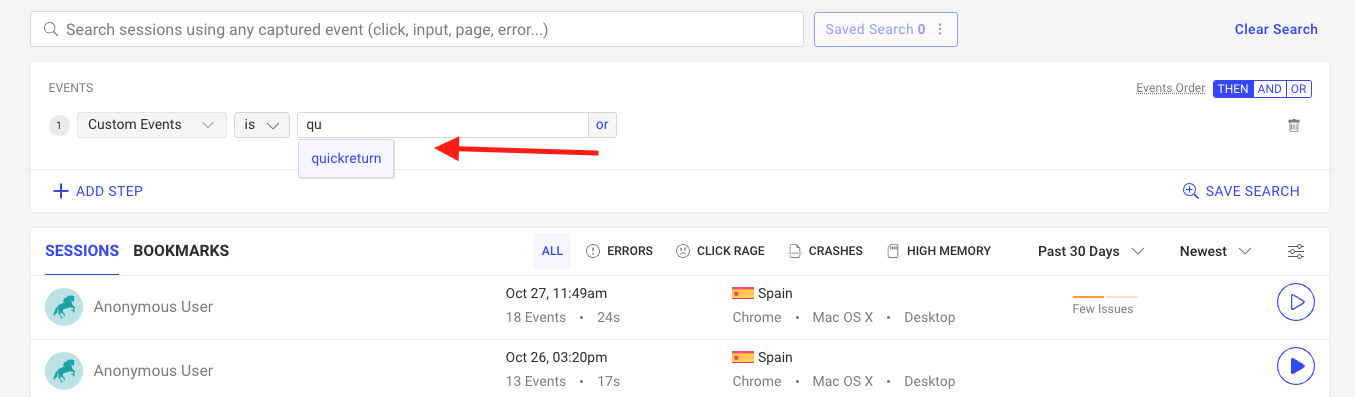
请注意,如果自动补全不起作用,或者没有返回你正在查找的事件名称,那么说明数据库中不存在以该名称命名的事件。在这种情况下,你应该再次检查你的逻辑,以确保你正确地触发了自定义事件的发送。
在 DevTools 中找到自定义事件
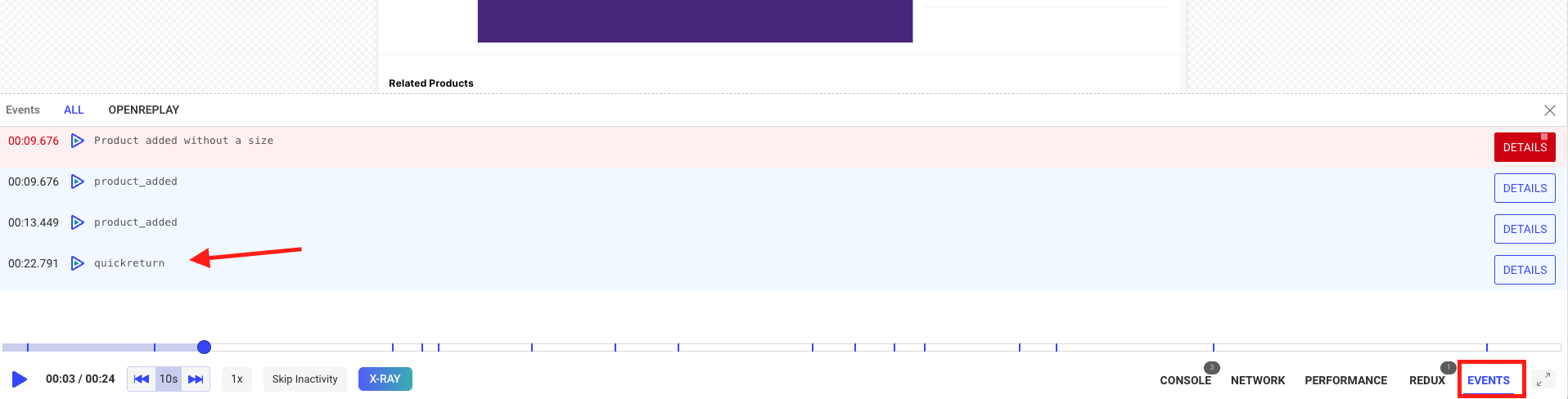
Section titled 在 DevTools 中找到自定义事件如果你想准确了解自定义事件是何时被触发的,那么你需要回放一个会话,并点击 DevTools 的 “Events” 标签页。 你会发现它位于屏幕的右下角。 点击后它会展开,你将看到事件列表,其中包括你的自定义事件,如下图所示:
通过这个简单的过程,我们创建了一个新的检测器。当然,你的算法可以更加复杂,并包含多种不同类型事件的组合。