CloudWatch
如何将 CloudWatch 与 OpenReplay 集成,并在会话回放旁查看后端错误。
1. 创建服务账号
Section titled 1. 创建服务账号- 登录你的 AWS 账号。
- 进入 IAM 控制台。
- 点击 Users。
- 点击 Add user 按钮。
- 将名称设置为 “openreplay_cw”。
- 在访问类型中,选择 Programmatic access。
- 点击 Next: Permissions 按钮。
- 选择 Attach existing policies directly
- 在权限列表中,选择 CloudWatchReadOnlyAccess。
- 点击 Next: Tags 按钮。
- 点击 Next: Review 按钮。
- 点击 Create user 按钮。
- 复制
Access key ID和Secret access key。
2. 在 OpenReplay 中启用 CloudWatch
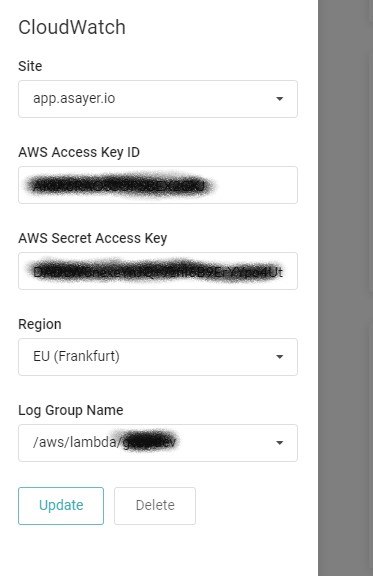
Section titled 2. 在 OpenReplay 中启用 CloudWatch在 OpenReplay 控制台的 ‘Preferences > Integration’ 中填入你的 Access key ID 和 Secret access key,选择区域,并从下拉列表中选择你想要跟踪的日志组。
3. 传递 openReplaySessionToken
Section titled 3. 传递 openReplaySessionToken为了将 CloudWatch 事件与已录制的用户会话关联起来,需要在每个你想跟踪的请求中将一个唯一令牌从前端传递到后端。这可以通过自定义 HTTP 标头来完成。在下面的示例中,我们使用 fetch 函数来发送该标头。
const headers = {
  Accept: 'application/json',
  'Content-Type': 'application/json',
};
if (tracker.getSessionToken()) { // use window.OpenReplay instead of tracker if you're using the snippet
  headers['X-OpenReplay-SessionToken'] = tracker.getSessionToken(); // Inject openReplaySessionToken
}
fetch('www.your-backend.com', {
  'GET',
  headers,
});
为了让 OpenReplay 能够将 Cloudwatch 日志条目与已录制的用户会话关联起来,需要在每个你想跟踪的后端错误中传递一个唯一令牌。
下面是一个使用 Monkey Patching 的 Python 示例。
import sys
import traceback
#...
old_tb = traceback.print_exception
old_f = sys.stdout
old_e = sys.stderr
OPENREPLAY_SESSION_TOKEN = None

class F:
    def write(self, x):
        if OPENREPLAY_SESSION_TOKEN is not None and x != '\n':
            old_f.write(f"[openReplaySessionToken={OPENREPLAY_SESSION_TOKEN}] {x}")
        else:
            old_f.write(x)

    def flush(self):
        pass

def tb_print_exception(etype, value, tb, limit=None, file=None, chain=True):
    if OPENREPLAY_SESSION_TOKEN is not None:
        value = type(value)(f"[openReplaySessionToken={OPENREPLAY_SESSION_TOKEN}] " + str(value))
    old_tb(etype, value, tb, limit, file, chain)

traceback.print_exception = tb_print_exception

sys.stderr = F()
标签名 openReplaySessionToken 区分大小写。