Dynatrace
了解如何将 Dynatrace 后端日志与 OpenReplay 会话回放集成,从而扩展您的监控和调试能力。
此集成适用于 Cloud(Serverless、Dedicated)和 Self-Host(Community、Enterprise) 用户。
1. 生成您的 Dynatrace 凭据
Section titled 1. 生成您的 Dynatrace 凭据按照以下步骤从 Dynatrace 获取所需的凭据:
- 登录您的 Dynatrace 账户。
- 导航到 Account Management
- 创建一个 OAuth Client:
- 点击 Identity & Access Management
- 选择 OAuth clients
- 点击 Create client 以生成所需的凭据。
- 保存您的凭据:
- 创建客户端后,保存以下内容:
- Client ID
- Client Secret
- Account URN
- 获取您的
environment ID:// Example Dynatrace URL: https://rzr85764.app.dynatrace.com/ Environment ID: rzr85764
2. 将 openReplaySession.id 传播到后端
Section titled 2. 将 openReplaySession.id 传播到后端要将 Dynatrace 日志与 OpenReplay 会话关联起来,必须在每个您想要跟踪的请求中,将唯一的会话 ID openReplaySession.id 从前端传播到后端。
在前端 API 请求中包含 openReplaySession.id
Section titled 在前端 API 请求中包含 openReplaySession.id修改您的前端代码,将 openReplaySession.id 添加到 API 请求的请求头中:
// JavaScript Example for for Single Page Applications (SPA):

// Import OpenReplay
import { tracker } from '@openreplay/tracker';

// Initialize the tracker
tracker.configure({
  projectKey: 'YOUR_PROJECT_KEY',
  ingestPoint: "https://openreplay.mydomain.com/ingest", // when dealing with the self-hosted version of OpenReplay
});

// Start the tracker and wait for it to resolve
tracker.start().then(() => {
  // Get the session ID after the tracker has started
  const sessionId = tracker.getSessionID();

  const headers = {
    'Content-Type': 'application/json',
  };

// Get the session ID
const sessionId = tracker.getSessionID();

const headers = {
  'Content-Type': 'application/json',
};

if (sessionId) {
  headers['openReplaySession.id'] = sessionId;
}

// Make the API request
fetch('/api/endpoint', {
  method: 'GET', // or 'POST', etc.
  headers,
  // ...other options
})
  .then(response => {
    // Handle response
  })
  .catch(error => {
    // Handle error
  });
在后端日志中包含 openReplaySession.id
Section titled 在后端日志中包含 openReplaySession.id在您的后端应用中,从传入的请求中提取 openReplaySession.id,并使用特定的键值格式 openReplaySession.id=<sessionId> 将其包含在您的日志中:
//  Example.....
// Middleware to extract the session ID
app.use((req, res, next) => {
  const sessionId = req.headers['openreplaysession.id'];
  req.sessionId = sessionId; // Attach to request object
  next();
});

// When logging events or errors
app.get('/api/endpoint', (req, res) => {
  // Your logic here

  // Log with the session ID in the required format
  console.log(`openReplaySession.id=${req.sessionId} - Endpoint accessed`);

  res.send('Success');
});

// Error handling middleware
app.use((err, req, res, next) => {
  console.error(`openReplaySession.id=${req.sessionId} - Error: ${err.message}`);
  res.status(500).send('Internal Server Error');
});
通过在后端日志中包含 openReplaySession.id,Dynatrace 可以收集与特定 OpenReplay 会话相关联的日志。这使您能够在 OpenReplay 的会话回放期间查看这些日志,从而全面了解用户交互和后端日志。
3. 在 Dynatrace 中创建自定义日志属性
Section titled 3. 在 Dynatrace 中创建自定义日志属性在 Dynatrace 中创建一个自定义日志属性,以从您的日志中提取 openReplaySession.id。
- 访问您的 Dynatrace SaaS 账户。
- 进入 Settings。
- 选择 Log Monitoring > Custom attributes,然后选择 Add custom attribute。
- 输入键
openReplaySession.id。
参考:请参阅 Dynatrace 文档中的详细步骤:Log custom attributes。
4. 在 OpenReplay 中配置 Dynatrace 集成
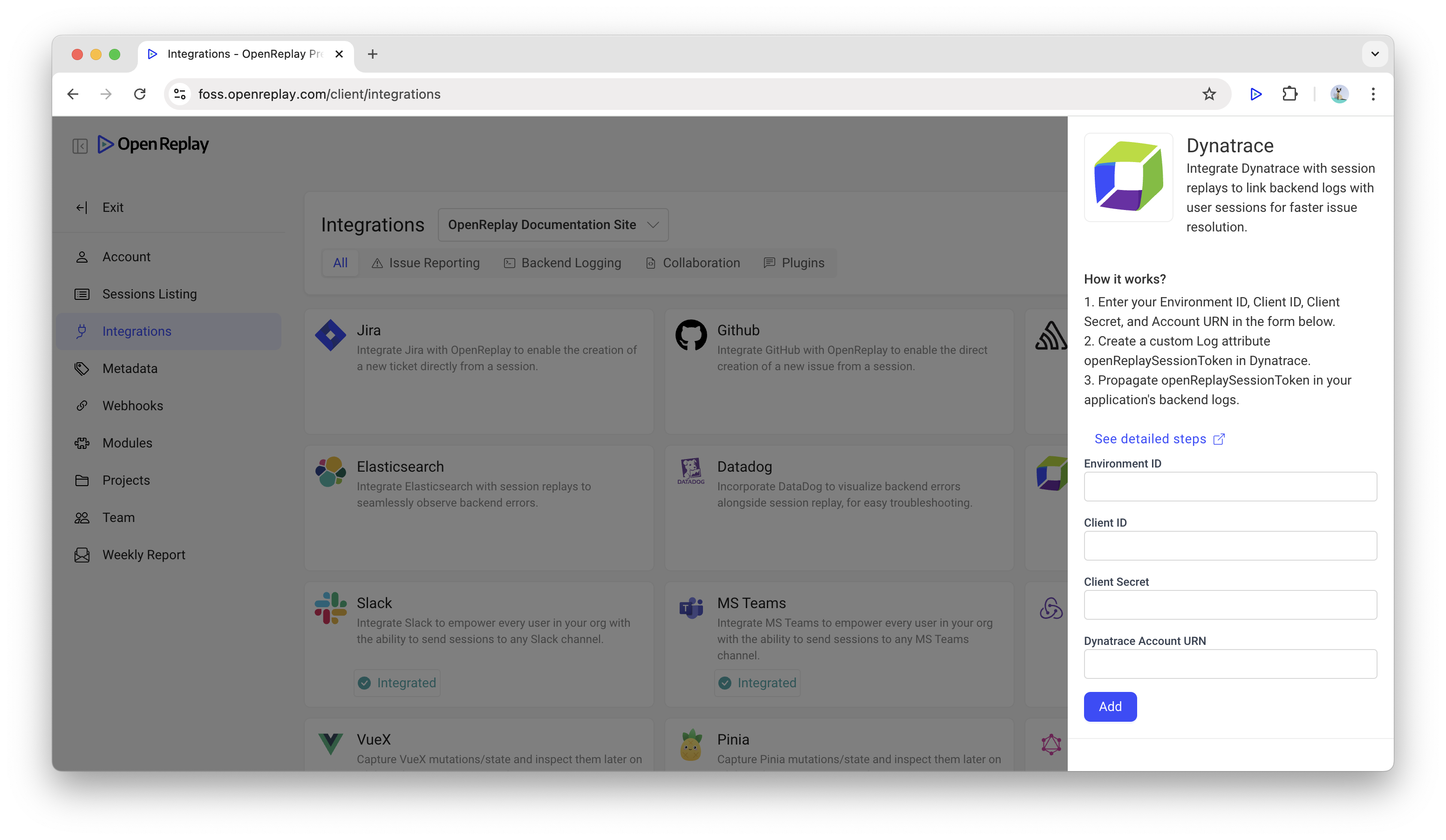
Section titled 4. 在 OpenReplay 中配置 Dynatrace 集成在您的 OpenReplay 账户中,按照以下 3 个步骤完成会话回放与 Dynatrace 后端日志的关联。
启用 Dynatrace 集成
Section titled 启用 Dynatrace 集成- 在 OpenReplay 中进入 Preferences > Integrations。
- 选择 Backend Logging 选项卡。
- 选择您要为其启用 Dynatrace 集成的项目:找到 Dynatrace 集成卡片 > 点击它。
输入 Dynatrace 凭据
Section titled 输入 Dynatrace 凭据在 Dynatrace 集成侧边栏中输入:
- Environment ID:用于外部访问的 Dynatrace 环境 ID。
- Client ID 和 Client Secret:从第一步保存的内容。
- Dynatrace Account URN:您在 Dynatrace 平台内使用的唯一标识符,同样是在第一步保存的内容。
- 点击 Add 测试连接:成功消息将确认集成已正确设置。
5. 在 OpenReplay 中查看 Dynatrace 日志
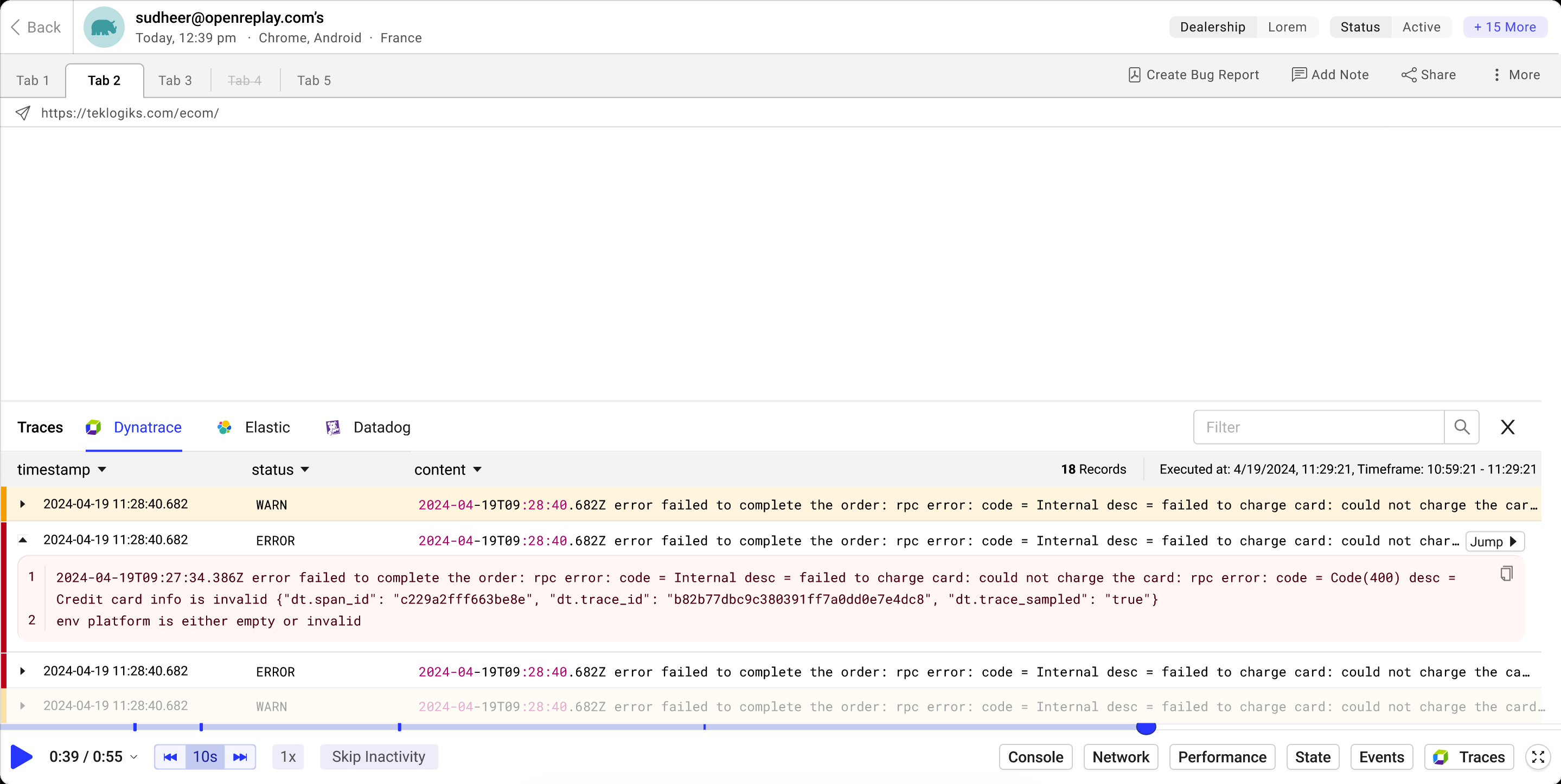
Section titled 5. 在 OpenReplay 中查看 Dynatrace 日志- 在 OpenReplay 中导航到 Sessions。
- 打开任意会话回放。
- 点击 Traces 按钮。
- 将显示与该会话相关的 Dynatrace 日志。
- 点击任意日志条目以查看详细信息。
类型为
LOG、状态为WARN、ERROR、INFO和NONE的日志通过 Dynatrace Log Monitoring API v2 检索。