Stackdriver
如何将 Stackdriver 与 OpenReplay 集成,并在会话录制旁边查看后端错误。
1. 创建 Google Cloud 服务账号
Section titled 1. 创建 Google Cloud 服务账号- 在 GCP 控制台中,前往创建服务账号密钥页面。
- 从服务账号列表中,选择 New Service Account。
- 在服务账号名称字段中,输入 “openreplay-stackdriver”。
- 从角色列表中,添加 Logging > Logs Viewer 和 Stackdriver > Stackdriver Accounts Viewer。
- 点击 Create 以下载包含你的密钥的 JSON 文件。
2. 在 OpenReplay 中启用 Stackdriver
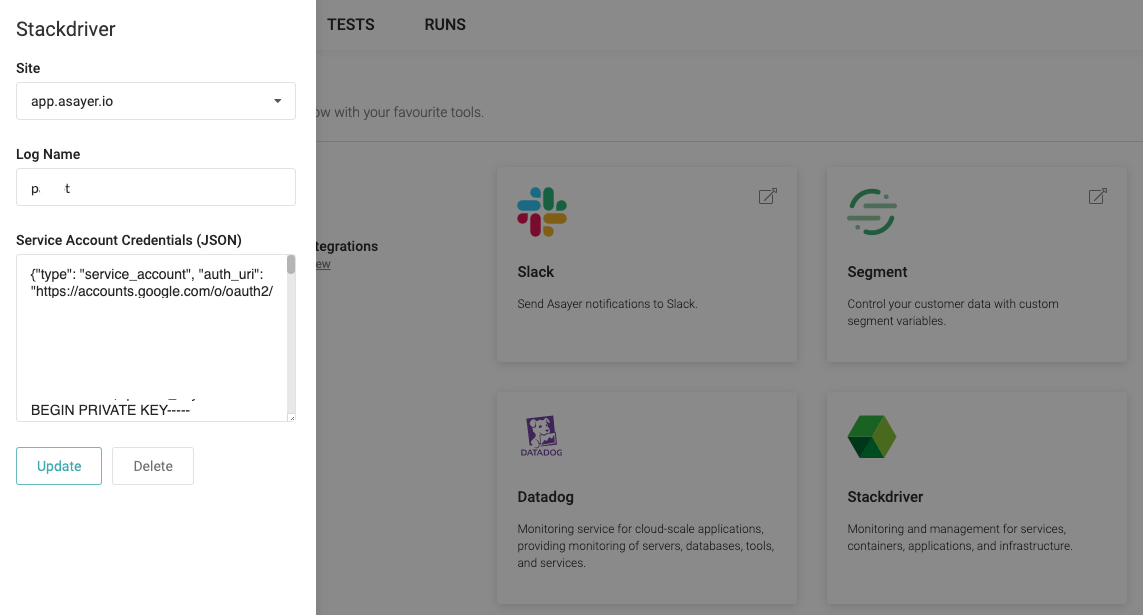
Section titled 2. 在 OpenReplay 中启用 Stackdriver在 OpenReplay 仪表板的 ‘Preferences > Integration’ 下粘贴你的 Log Name 和 openreplay-stackdriver 凭据。
3. 传播 openReplaySessionToken
Section titled 3. 传播 openReplaySessionToken为了将 Stackdriver 事件与录制的用户会话关联起来,必须在你想要追踪的每个请求中,从前端向后端传播一个唯一令牌。这可以通过自定义 HTTP 标头来实现。在下面的示例中,我们使用 fetch 函数来发送该标头。
const headers = {
  Accept: 'application/json',
  'Content-Type': 'application/json',
};
if (tracker.getSessionToken()) { // or window.OpenReplay instead of tracker if you're using the snippet
  headers['X-OpenReplay-SessionToken'] = tracker.getSessionToken(); // Inject openReplaySessionToken
}
fetch('www.your-backend.com', {
  'GET',
  headers,
});
为了让 OpenReplay 能够将 Stackdriver 日志条目与录制的用户会话关联起来,必须将一个唯一令牌作为 label 传播到你想要追踪的每个后端错误中。
下面是一个使用 Stackdriver Python API 的示例。
google_logger.log_text("A LOG ENTRY", severity='ERROR', labels={"openReplaySessionToken": OPENREPLAY_SESSION_TOKEN})

#or

google_logger.log_struct({"message": "A LOG ENTRY"}, severity='ERROR', labels={"openReplaySessionToken": OPENREPLAY_SESSION_TOKEN})
标签名称 openReplaySessionToken 区分大小写。